
July 02, 2026
Microsoft’s Copilot Learns to Finish the Job in Dynamics 365, Not Just Start It, With Service Agent and New MCP Tools Availability
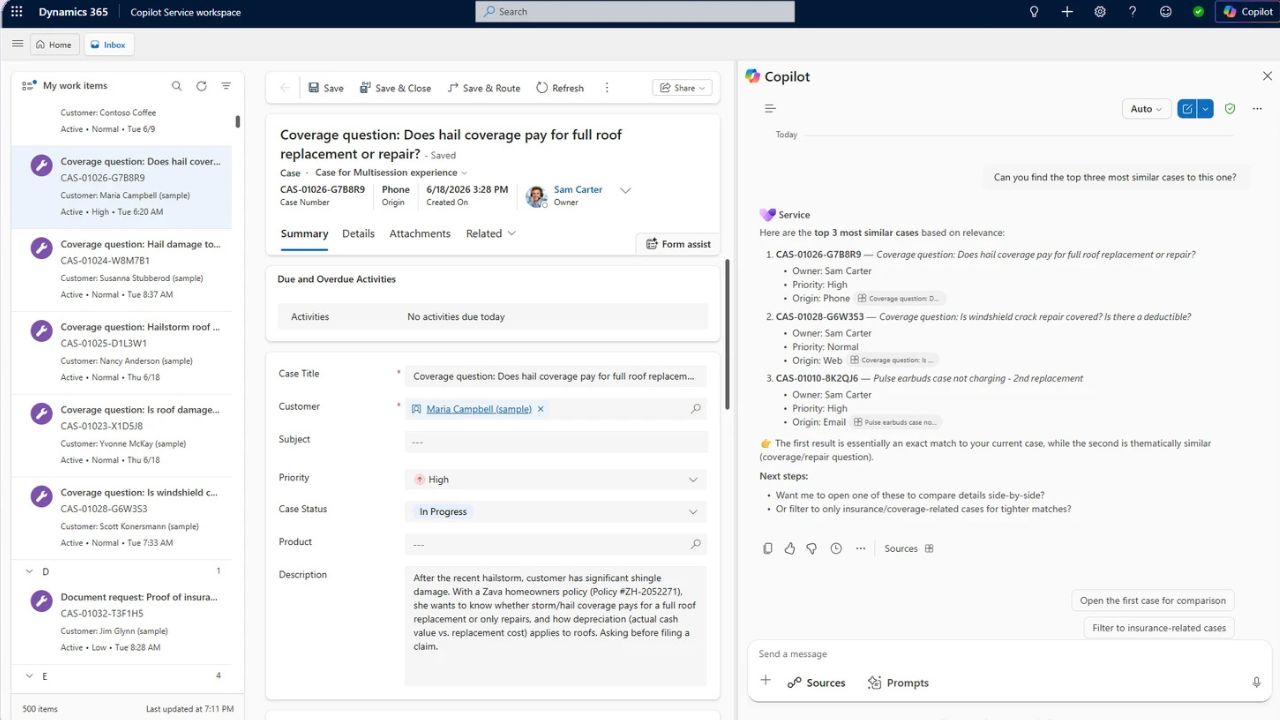
Microsoft’s Service Agent went fully live inside Microsoft 365 Copilot this week, three months after its public preview debut. Essentially, this means that customer service reps can now ask Copilot to act on a case, not just explain one.
Until now, Service Agent has worked as a research layer. It could prioritise cases, summarise a customer’s history, and pull relevant articles from Dataverse and SharePoint. Handy, but it still left the actual work, such as updating the record, drafting the reply, and logging the follow-up, to the human. General availability changes that.
Microsoft has released a dedicated MCP server for service work carrying more than 70 new tools, as well as 20-odd product updates. Copilot can now update cases, draft customer communications, and suggest a next step. This transpires all inside the same chat window a rep was already using.
Alan Ross, Vice President at Microsoft Customer Service AI, wrote in an announcement blog:
“The result is a more connected, action-oriented experience that helps service professionals move from understanding to resolution faster.”
Copilot also now renders interactive cards, forms, and grids directly in the conversation instead of dumping everything back into plain text. A rep investigating an account issue can work the problem inline rather than bouncing to a separate screen.
Northern Trust was among the customers Microsoft quoted at launch:
“What excites us about Service Agent is the move from reactive search to proactive intelligence.”
Access still runs through existing Dynamics 365 and Microsoft 365 Copilot licensing, with rollout controlled centrally through the admin centre, role by role.
The Bigger Picture With Copilot Service Agent
Genesys has spent the past year building its own copilot suite around modular AI Skills. Salesforce has been pushing Agentforce hard as the agentic front door to its CRM, too. Microsoft’s hedge is that owning the productivity suite with Outlook, Teams, and Word gives it a structural edge rivals can’t easily copy. The agent doesn’t need to be invited into a separate app because reps are already living inside Copilot all day.
Microsoft’s Mala Anand put the ambition plainly, saying the aim is to help teams “resolve each customer case faster” and cut down on routine manual work. Whether that holds up against Genesys or Salesforce’s own agentic push will be fascinating.
What it Means for Microsoft 365 and Dynamics 365 Service Teams
Perhaps the most practical change for reps is fewer tabs. Anyone who’s fielded a billing dispute knows the routine. It can entail a case screen, a knowledge base, an account history, and three windows for one reply. Folding that into a single conversation should save real minutes, multiplied across a busy queue. The same tooling extends into quality scoring and coaching signals, too. This hands supervisors a live read on how service is actually going rather than a report pulled together after the fact.
The open question is oversight. Microsoft describes granular, reversible controls by role and queue, which is a sensible design. However, it’s not yet clear from public materials whether a human needs to approve an agent-drafted message before it reaches a customer or whether that’s left to admin discretion. Anyone weighing a pilot would do well to get a straight answer on that before switching anything on.